Built for UK restaurants

Bookings, floor, till and kitchen.One app.

Slotivo takes commission-free bookings on your own website, protects them with deposits, seats them on the right table, and runs the bill from first order to last payment.

Free for one venue. No card needed.

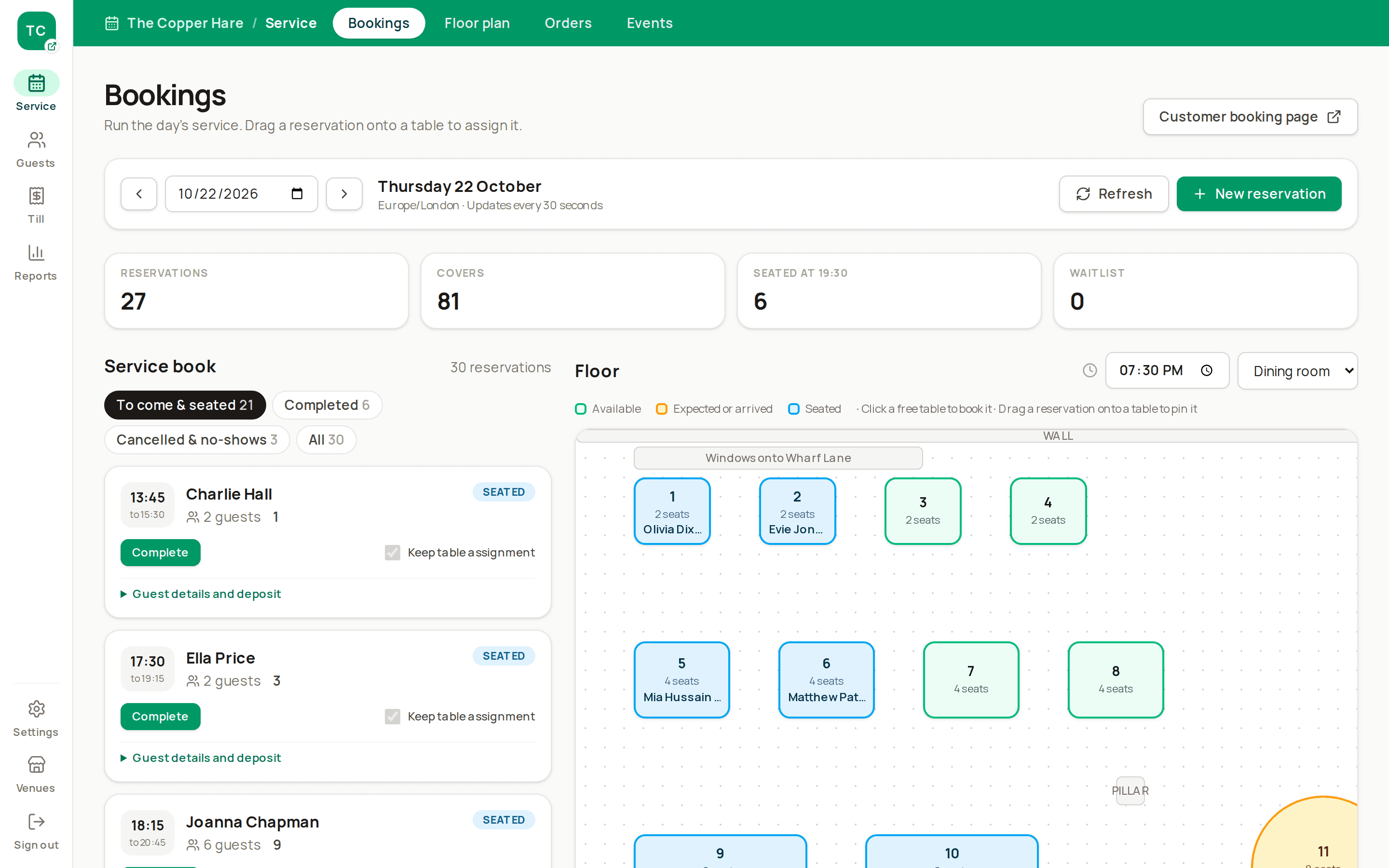
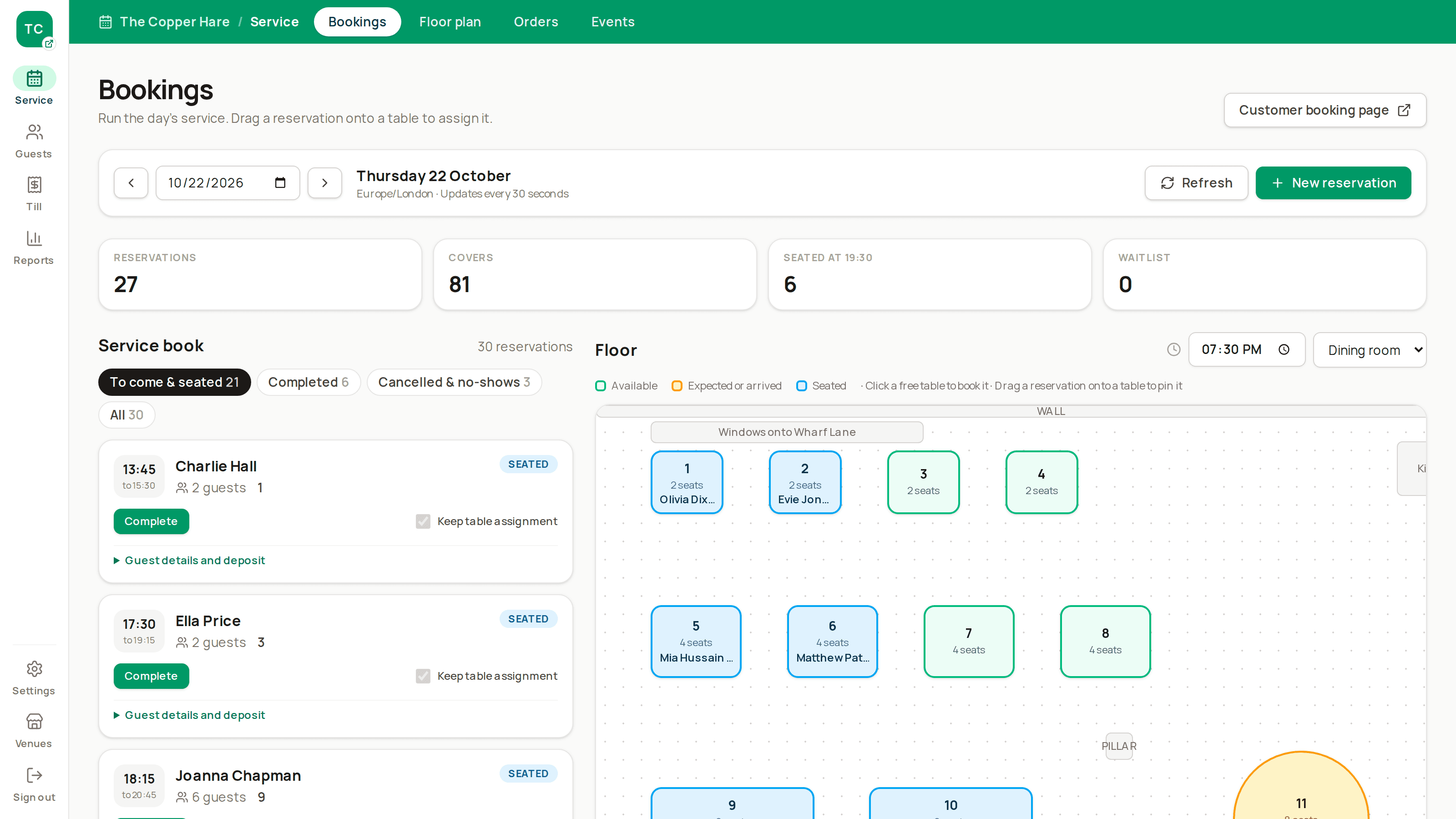
Admin dashboard during service: Tonight's bookings and the live floor plan, as a host would see them at 7:30pm.
  1. 01

    Guest books

    On your site, socials or a table-card QR code.

  2. 02

    Table is set

    Best-fitting table chosen, deposit taken.

  3. 03

    Order is fired

    Till sends tickets to kitchen and bar screens.

  4. 04

    Bill is settled

    Split, paid and receipted, deposit included.

Why Slotivo

Every feature is there to earn or save you money

Margins in hospitality are thin. Slotivo is built around the places where restaurants lose revenue: empty tables, no-shows, slow turns, waste and admin.

Premium dates sold upfront

Sell Mother's Day, Christmas Day and other big dates at a fixed per-person price, with full payment or a deposit taken when guests book.

More covers from the same room

Smart table allocation, joins, pacing and waitlist resale fill seats that first-come seating leaves empty.

Fewer no-shows

Deposits, card guarantees, email and SMS reminders, and one-tap cancel links that release tables early.

Faster table turns

A touch till, split bills, course firing and kitchen timers keep each service moving.

Less waste, fewer comps

Kitchen notes, sold-out items, held-course prep and VOID tickets stop dishes being cooked for nobody.

Less admin

Bookings, reminders, waitlist offers and rebooking run on their own, so staff stay on the floor.

No commission, no lock-in

Guests book direct through your own channels, and your guest data exports to CSV whenever you like.

Extra food sales

Prepaid collection and delivery orders through your own ordering page, with kitchen limits that protect dine-in service.

Online bookings

Take bookings while you're closed, or too busy to pick up

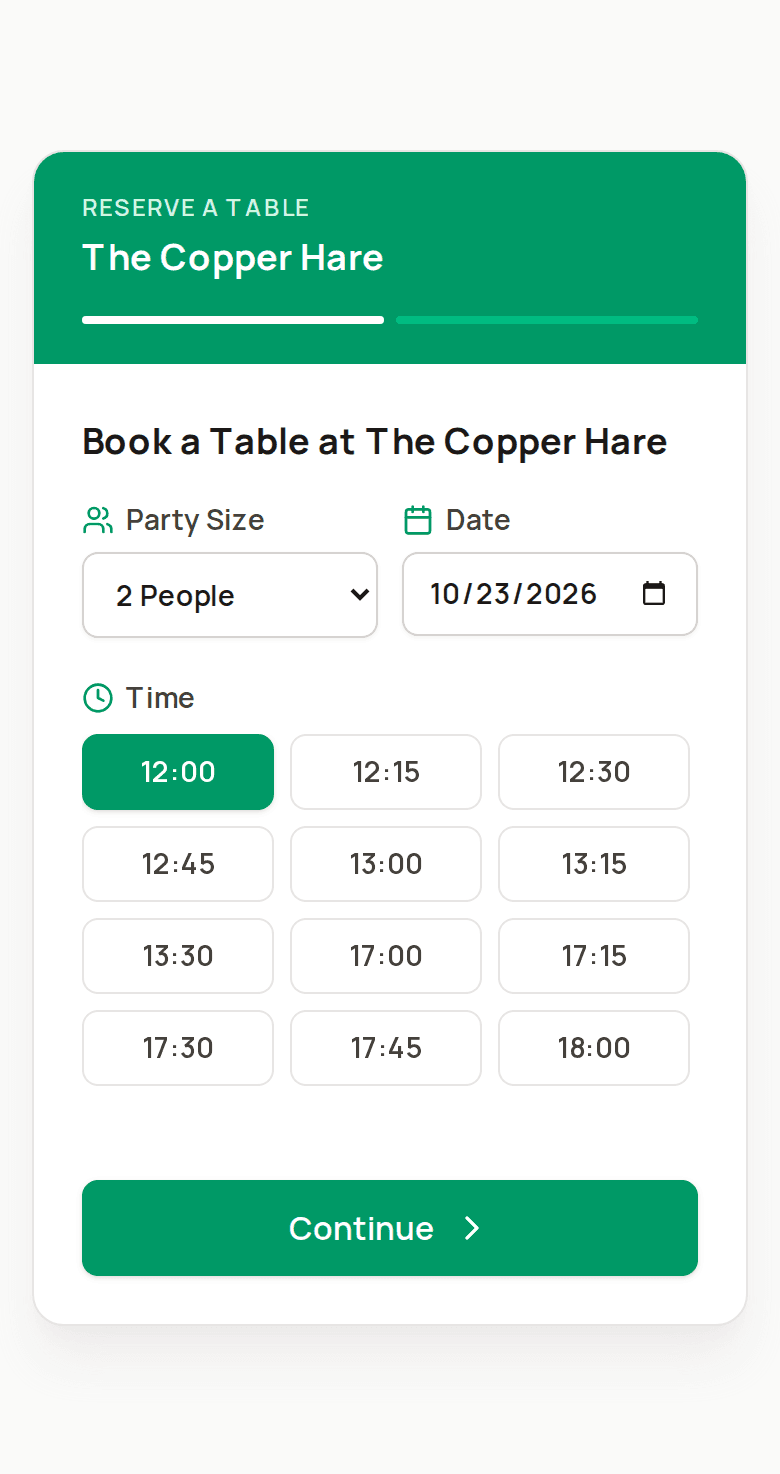
Your own booking page shows only the times that really fit: opening hours, table sizes, dining durations, reset buffers and arrival pacing are all taken into account.

  • Branded booking link, website embed and printable QR code for table cards
  • Standard card, horizontal booking bar or compact sidebar, with live style previews
  • Lunch and dinner services, special dates and bank holidays handled properly
  • Full date? Guests see the nearest dates with space, or join the waitlist
  • Every confirmation carries a private change-or-cancel link
Public booking page: /widget/your-venue on a phone: party size, date and available times.

Your website

A booking form that fits your restaurant

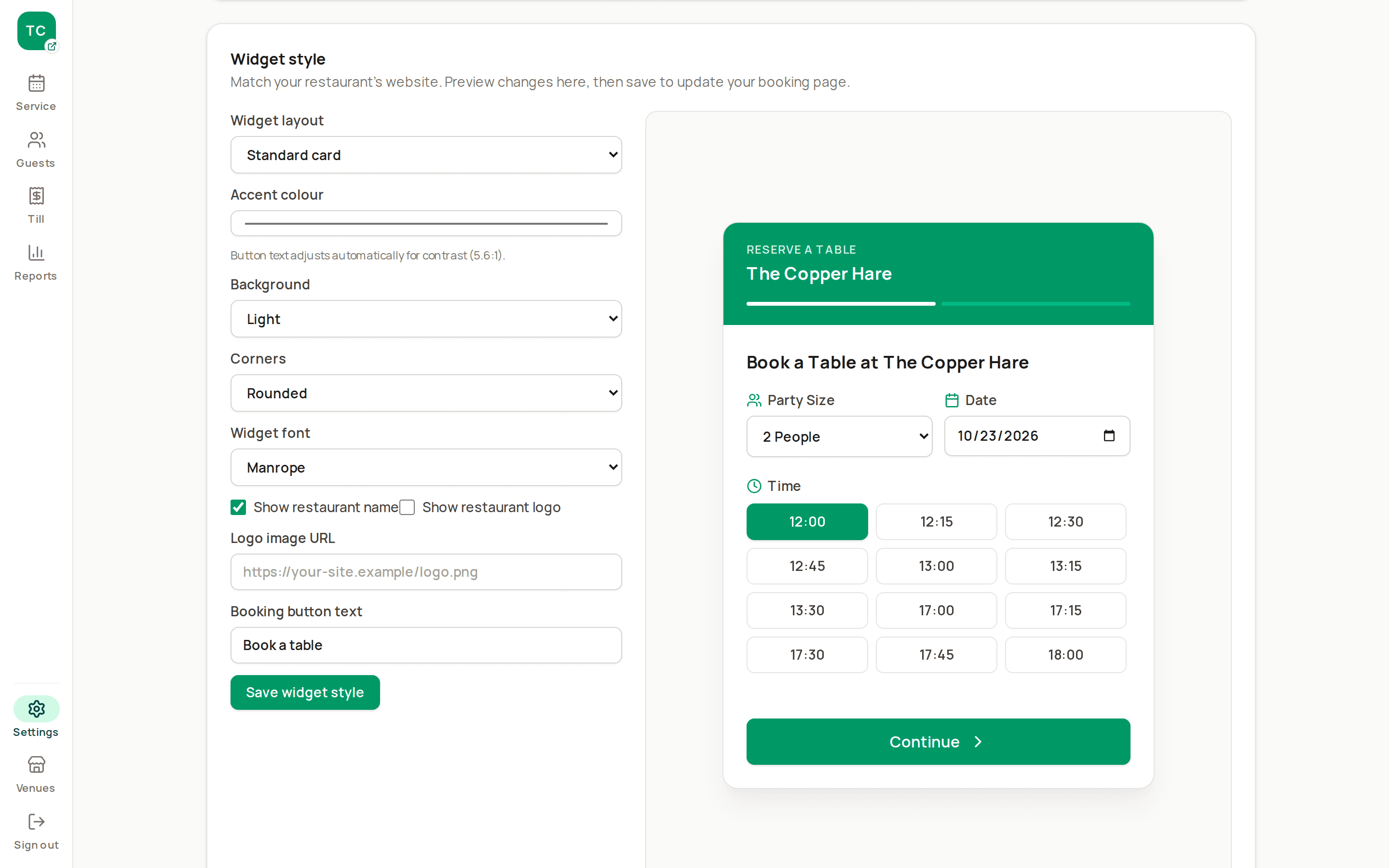
Choose a standard card, a horizontal booking bar or a compact sidebar. Match your colours, font, corners and logo in a live preview, then copy the embed code.

  • Readable button text adjusts to your accent colour
  • Light or dark backgrounds
  • The booking bar opens a full booking dialog
  • Script and plain iframe embeds
Widget layout and style picker: Settings with layout, accent colour and branding controls beside the live widget preview.

Deposits and no-show protection

Guests who've paid turn up

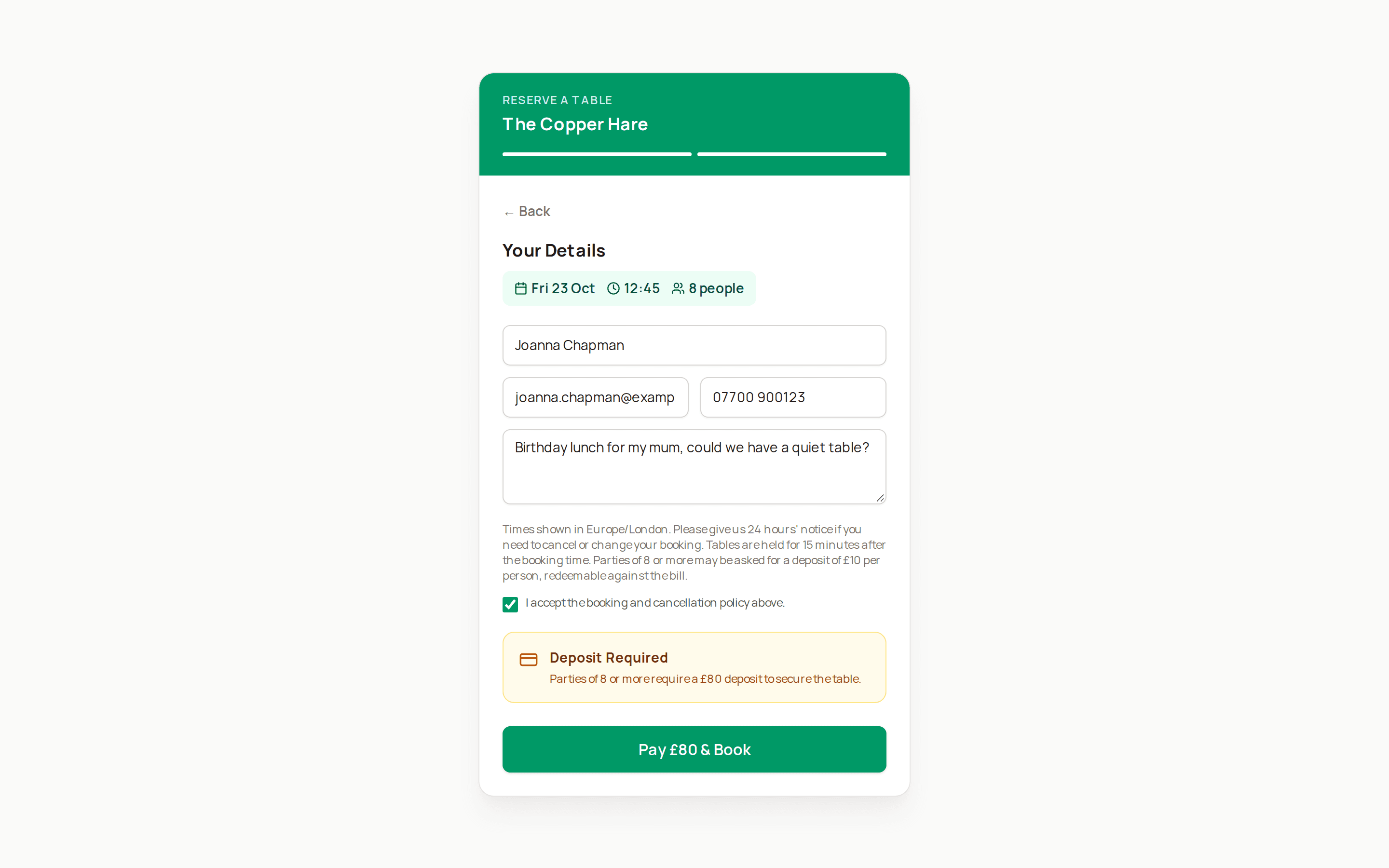
Take a fixed or per-person deposit through Stripe, paid straight into your own Stripe account. On quieter dates, ask for a saved card instead and charge a no-show fee only if you need to.

  • Deposits applied to the final bill automatically at the till
  • Partial refunds tracked against Stripe
  • Unpaid checkouts hold a table briefly, then release it
  • Reminders by email and SMS the day before
Deposit checkout: Booking details for a party of eight, with the £80 deposit to pay before the table is confirmed.

Events

Sell your busiest days at a set price, paid before the night

Put Mother's Day, Father's Day or Christmas Day on your booking page as an event with a per-person price and a set menu. The event can take the whole day or just a window, such as the evening, and normal tables stay bookable outside it.

  • Take full payment, a per-person deposit, or payment on the day
  • Optional cover cap so the kitchen is never oversold
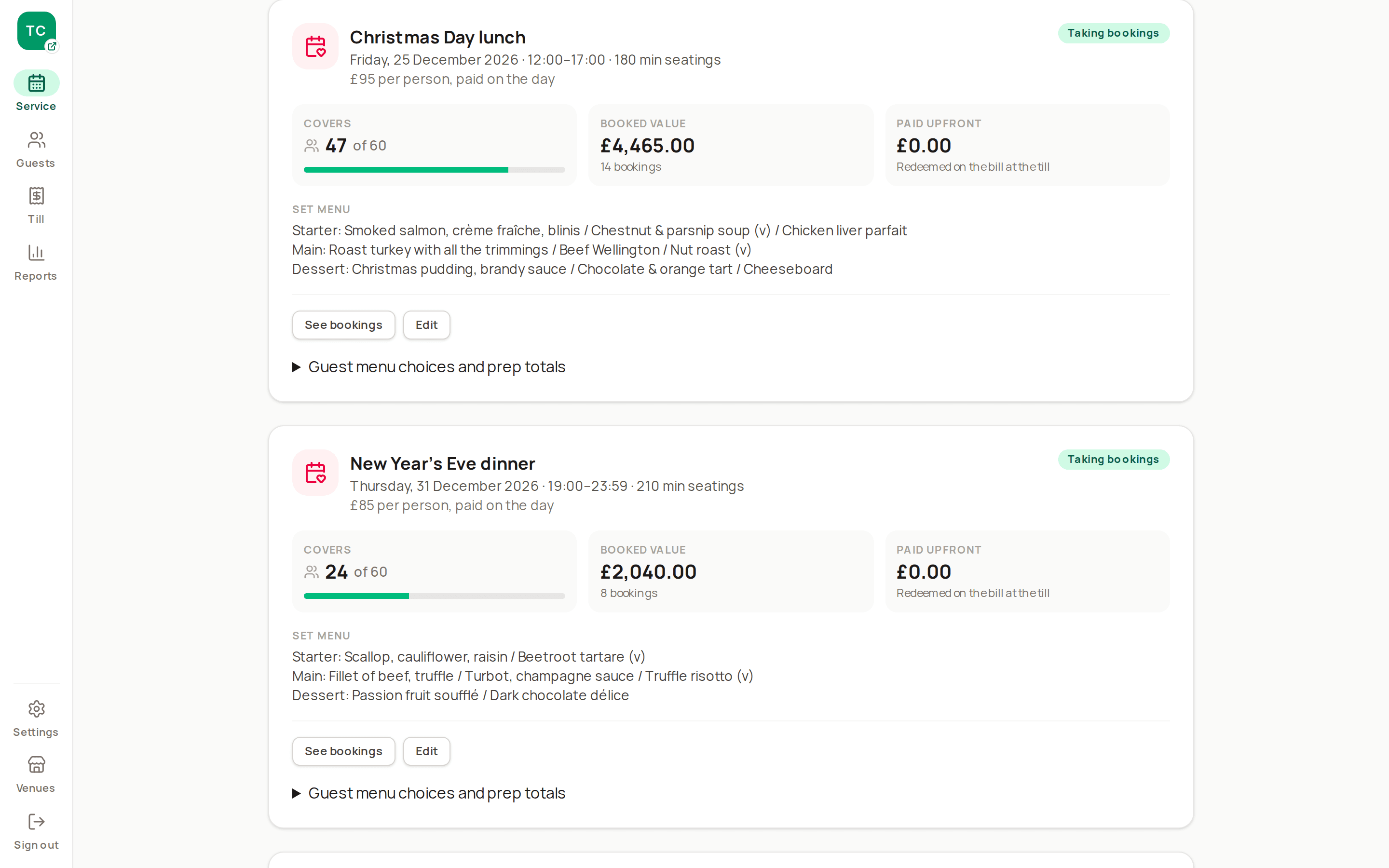
  • Events page shows covers sold, booked value and money paid upfront
  • Event bills open with the set menu, and prepayments are redeemed at the till
  • Staff record course choices, with prep totals and no extra charge for included dishes
Events page: A Christmas Day event: per-person price, time window, covers sold against the cap and booked value.

Floor plan and tables

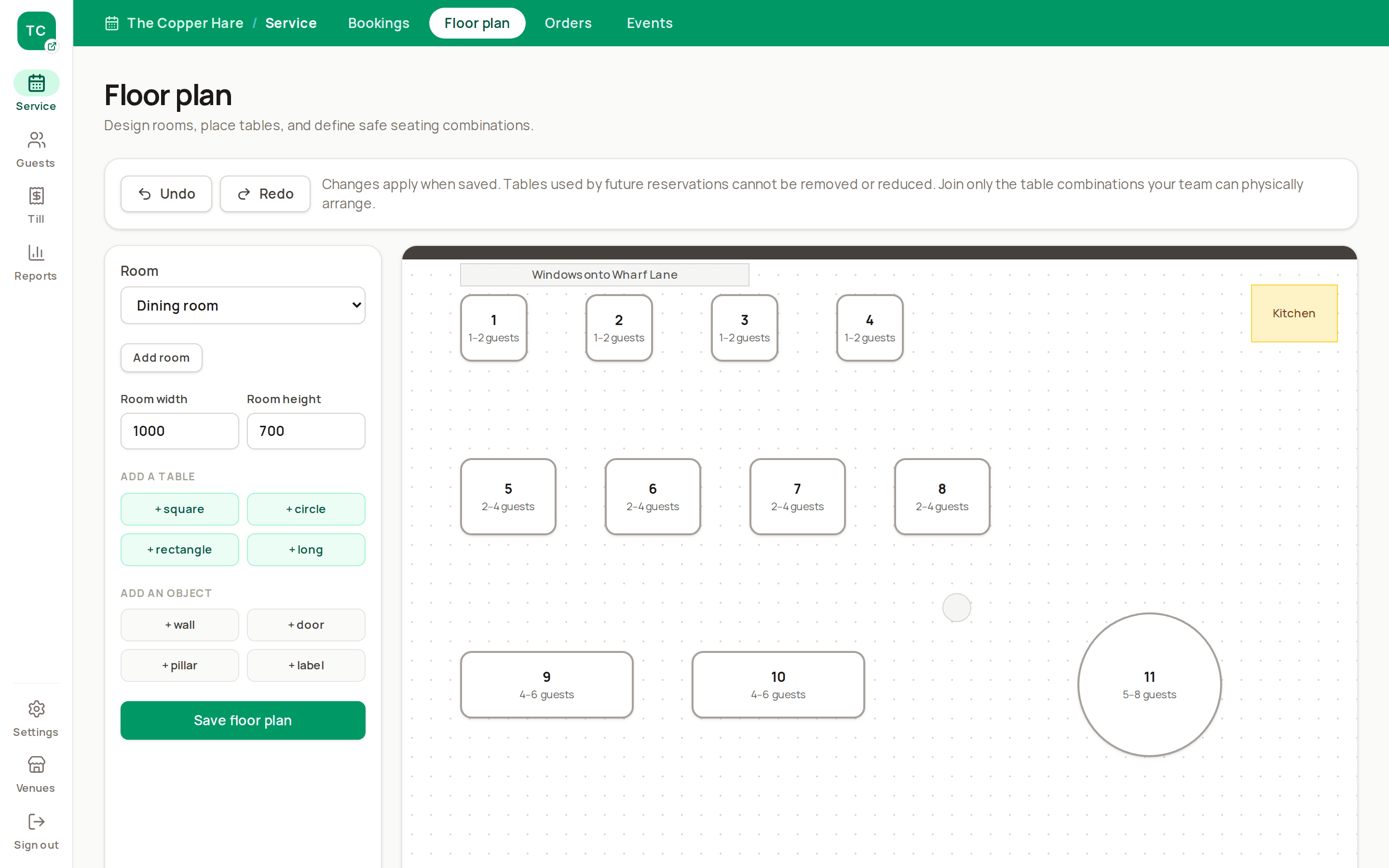
One floor plan runs bookings, the host stand and the till

Draw your rooms with tables, walls, doors and pillars. Set which tables can join and how many each one seats, and Slotivo minimises unused seats across current bookings while respecting staff locks.

  • Automatic allocation that reshuffles future bookings to make room
  • Pin a regular to their favourite table without turning allocation off
  • Hold tables back for walk-ins, or cap online covers per day
  • Close a table or room for private hire, and affected bookings move
Floor plan builder: Admin → Layout: a dining room with round and square tables, walls and a door.

Front of house

See the whole service at a glance

Today's bookings, arrivals and seating status sit on the live floor plan. The table diary shows the gaps you can sell to walk-ins or offer to the waitlist.

  • Seat walk-ins and waiting guests straight onto the plan
  • Confirmed, seated, completed and no-show, tracked per booking
  • Floor view refreshes itself every 30 seconds
Service view: Tonight's list beside the live floor plan, with seated and due tables coloured.

Point of sale

Reservations + Till and Multi-venue

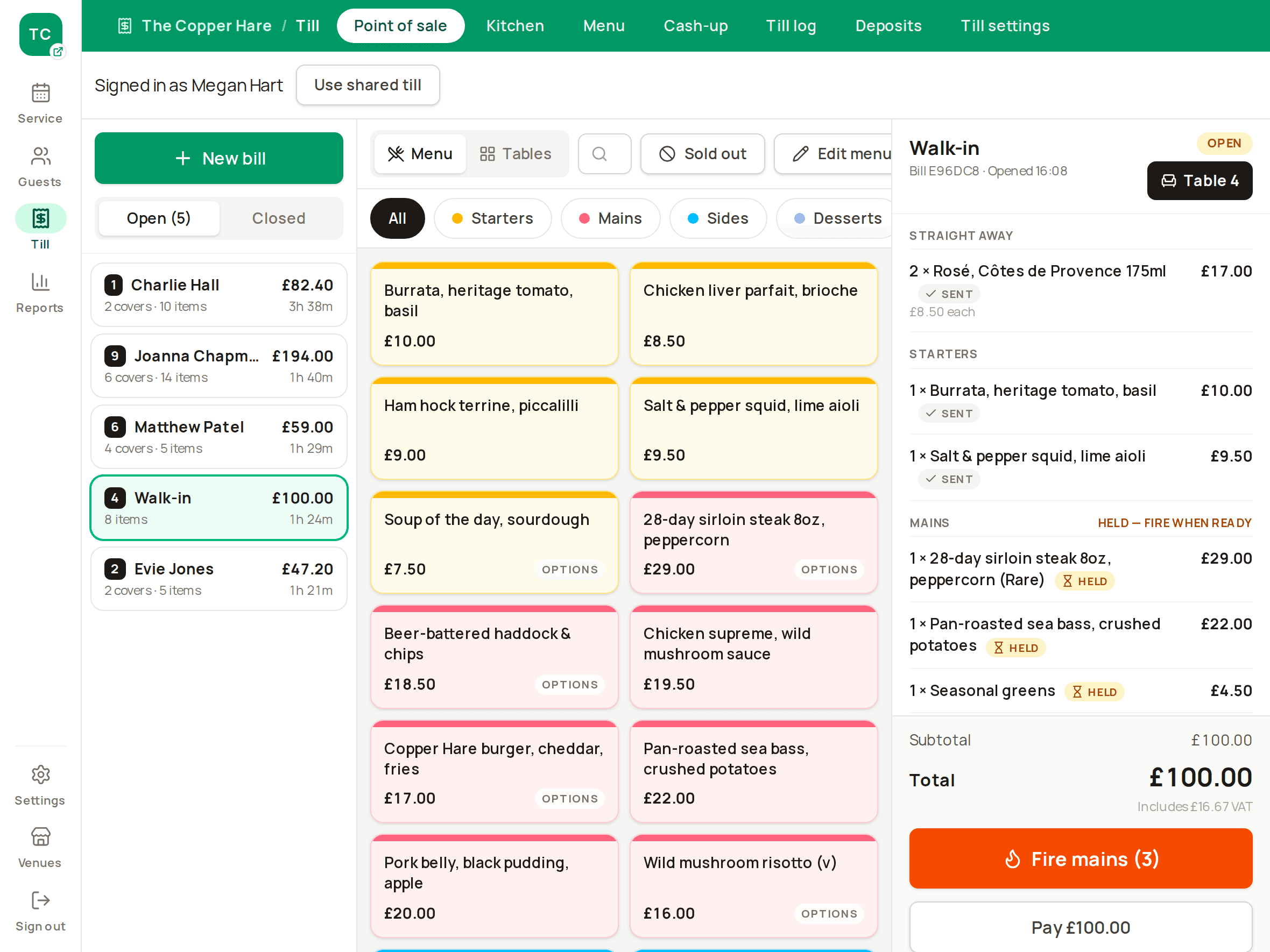
A till new staff can use on their first shift

Colour-coded menu tiles, one-tap items and a three-pane layout built for iPad or desktop. Bills sit on floor-plan tables, so nobody charges the wrong one.

  • Item options with prices, so upsells are always charged
  • Split evenly or by item, with a fair share of service and discount
  • Card, cash and deposit payments, with change due
  • Staff sign on to a shared iPad with their own code, and it locks itself when left
  • Every void, refund and discount needs a reason, kept in the Till log
  • Cash-up and Z-report at the end of the night
Touch till: iPad landscape: category tiles, the menu grid and an open bill for Table 4.

Kitchen and bar

Reservations + Till and Multi-venue

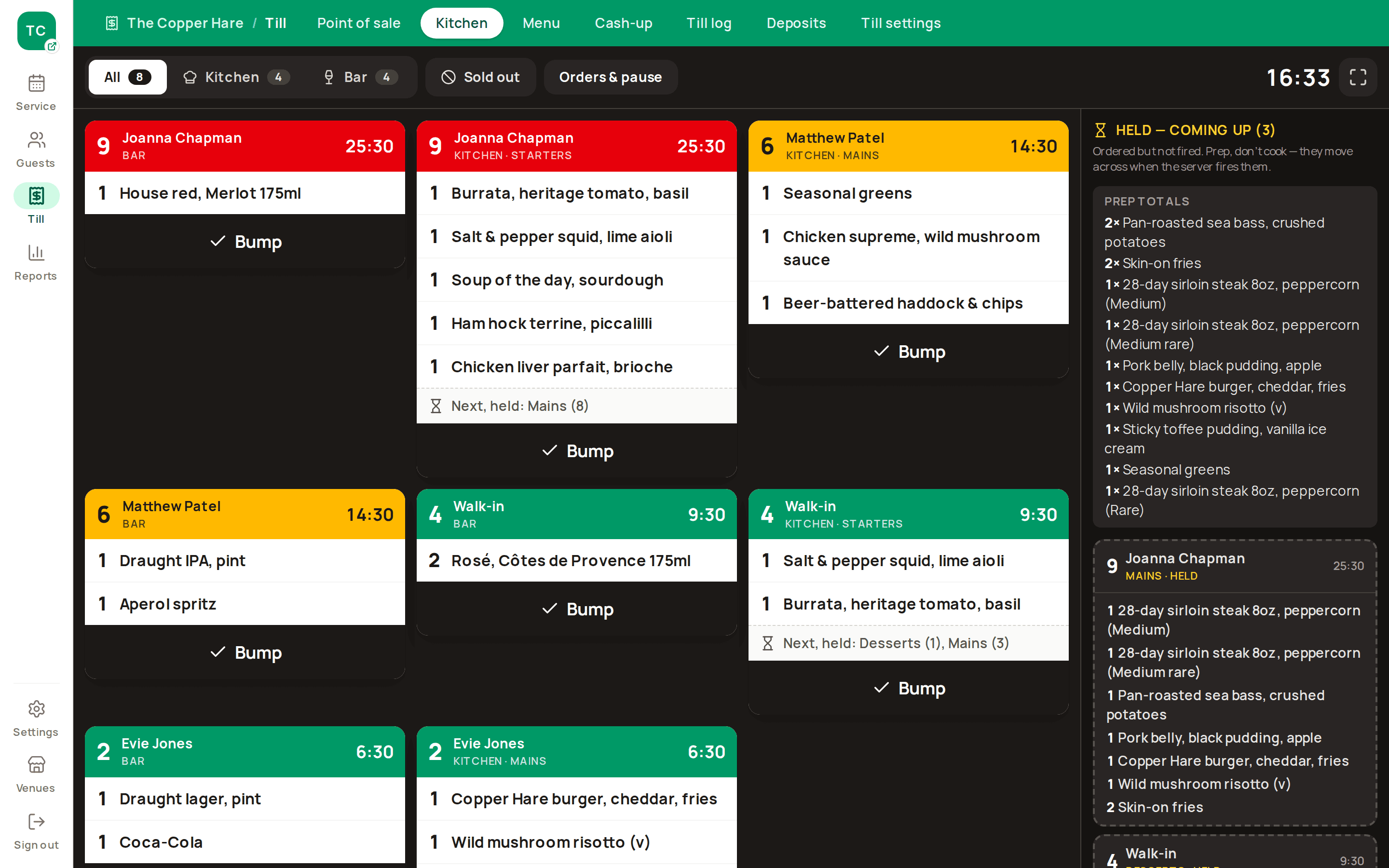
Tickets the pass can read across the room

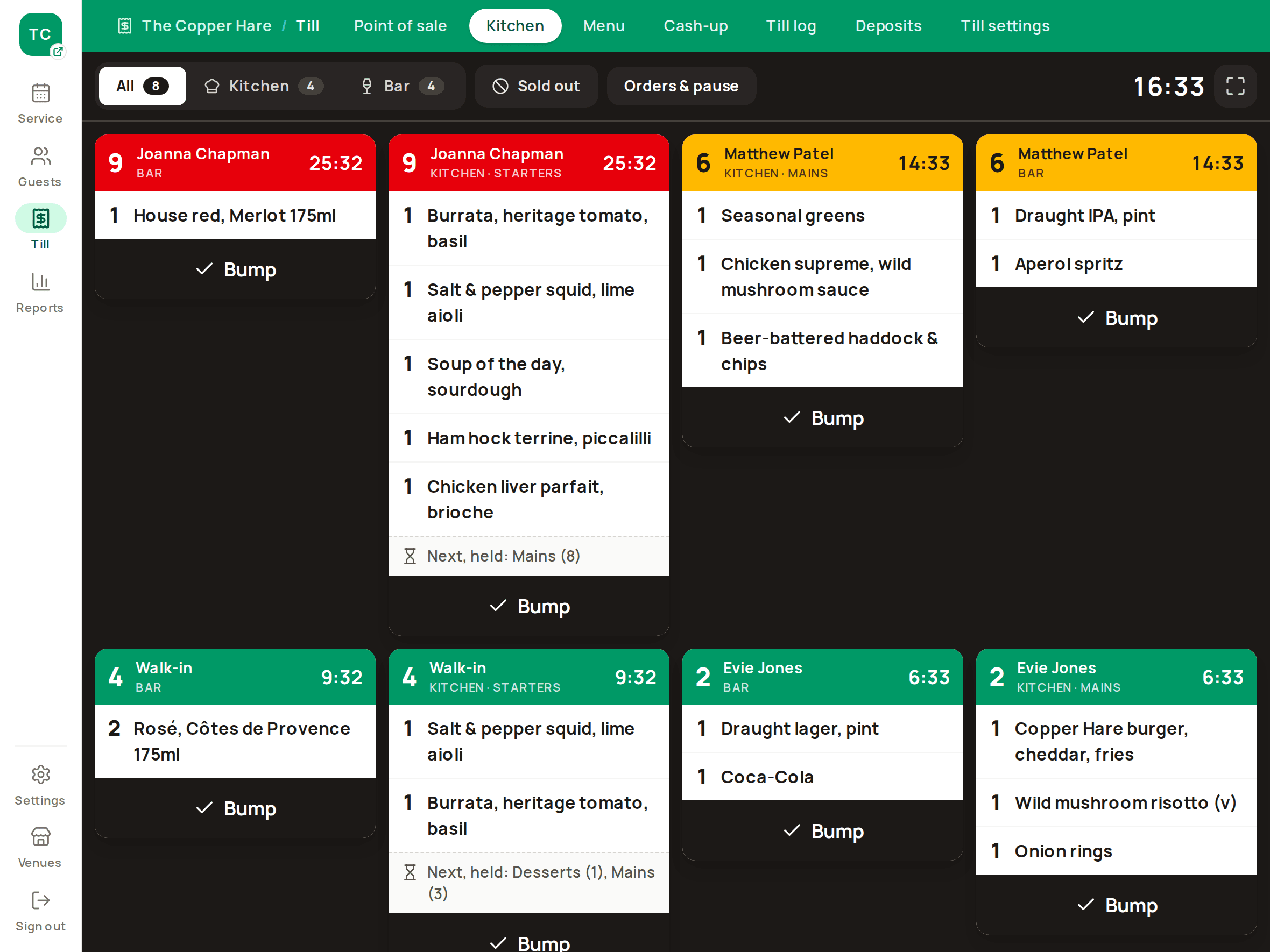
Orders split into kitchen and bar tickets automatically. Timers turn amber at 10 minutes and red at 20, so late tables show up before guests complain.

  • Starters go straight away and mains wait to be fired, or send everything together
  • Held courses show in a “coming up” lane so chefs can prep ahead
  • Mark an item sold out (86) and it can't be rung up anywhere
  • Kitchen logins see the kitchen screen and nothing else
Kitchen display: Full-screen tickets with an amber timer, a red one, and the held-course lane.

Printers and card machines

Reservations + Till and Multi-venue

Plug in the printer and card machine you already know

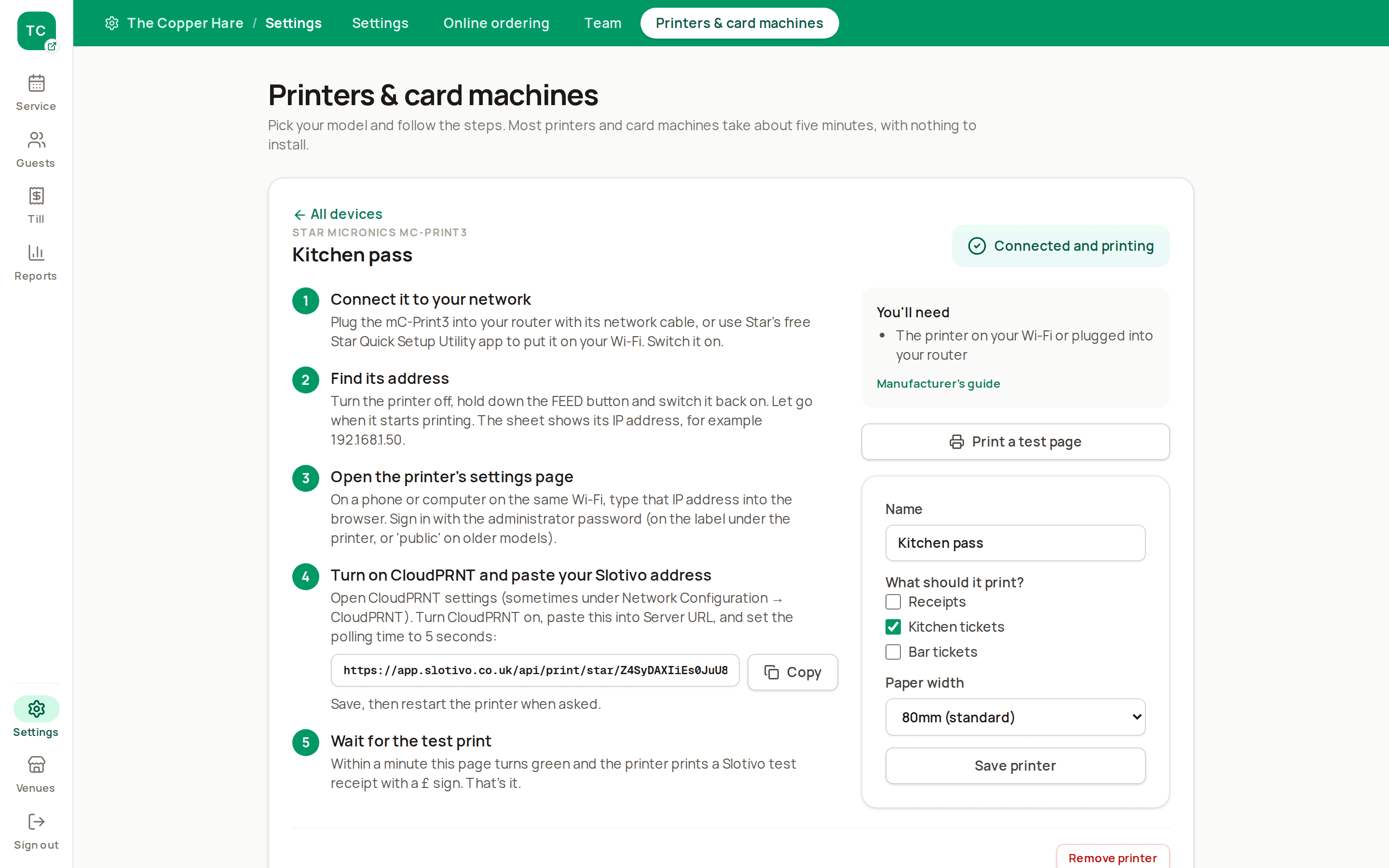
Pick your exact model in Settings and follow the steps for it, with your own address or code filled in. The page turns green when the device connects, so there's no engineer visit.

  • Cloud receipt and kitchen printers with nothing to install
  • The small Slotivo Bridge drives most other network and USB thermal printers
  • Held courses print as “prep, don't cook”, and firing prints a FIRE slip
  • Card sends the exact amount to a Stripe or Square card machine, and the bill settles itself
  • Refunds go back to the guest's card from the till
Printer and card machine setup: Settings → Printers & card machines: a printer model chosen, with its setup steps and a green Connected badge.

Collection and delivery

Add-on for till plans

Takeaway orders on your own page, cooked when the kitchen has room

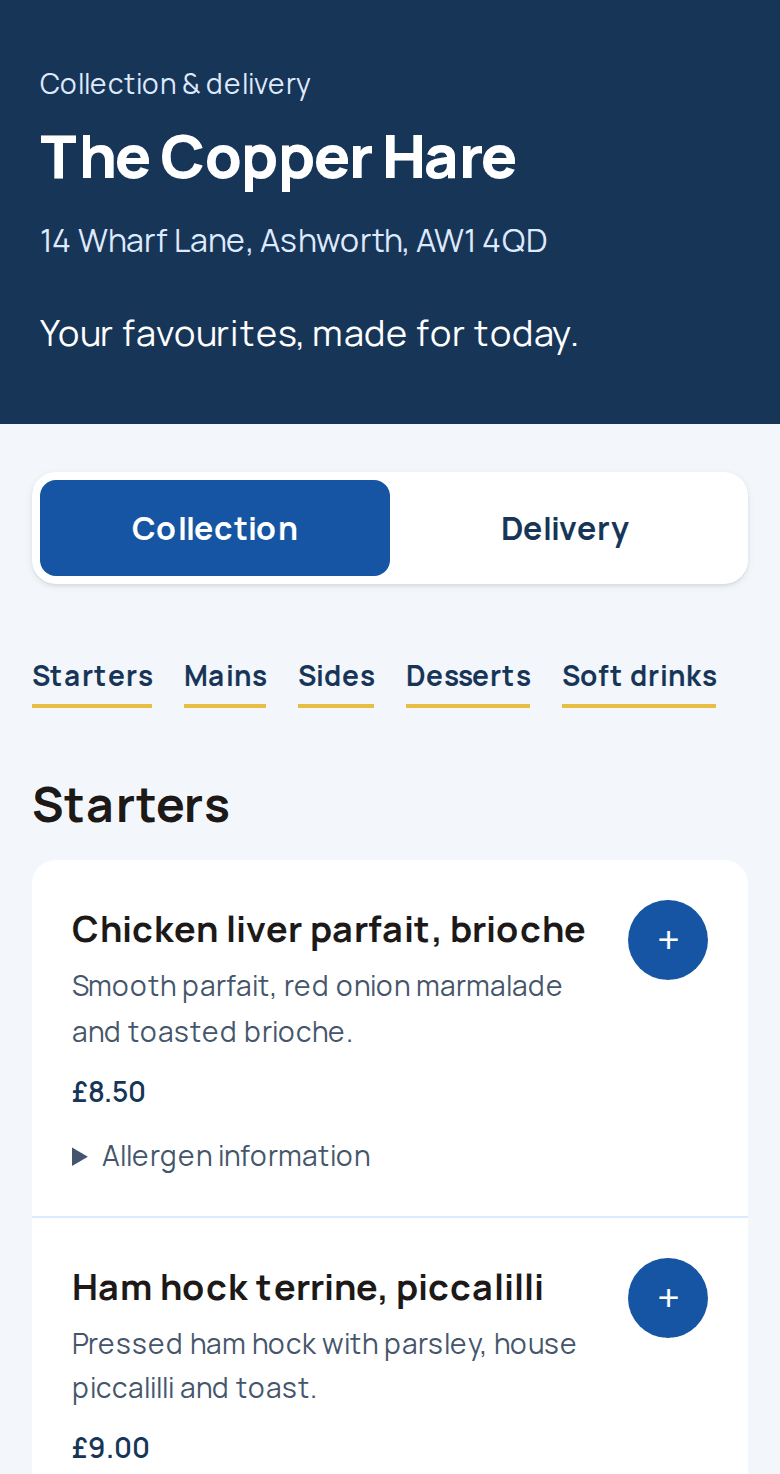
Customers order and pay for today at your own ordering page, for collection or delivery by your own drivers. Paid orders reach the kitchen and bar screens when it's time to cook them, not all at once.

  • One menu, with collection and delivery prices, descriptions and allergens
  • Your hours, delivery postcodes, fees and minimum spend
  • Limits on orders and food every 15 minutes, and a pause when the dining room is full
  • Pause collection, delivery or both from the kitchen in one tap
  • Customers track their order and can cancel for a full refund before it's cooked
  • No commission per order: payment goes to your own Stripe account
Takeaway ordering page: /order/your-venue on a phone: collection or delivery and the menu by category.

Guests and reports

Know your regulars, and where money is leaking

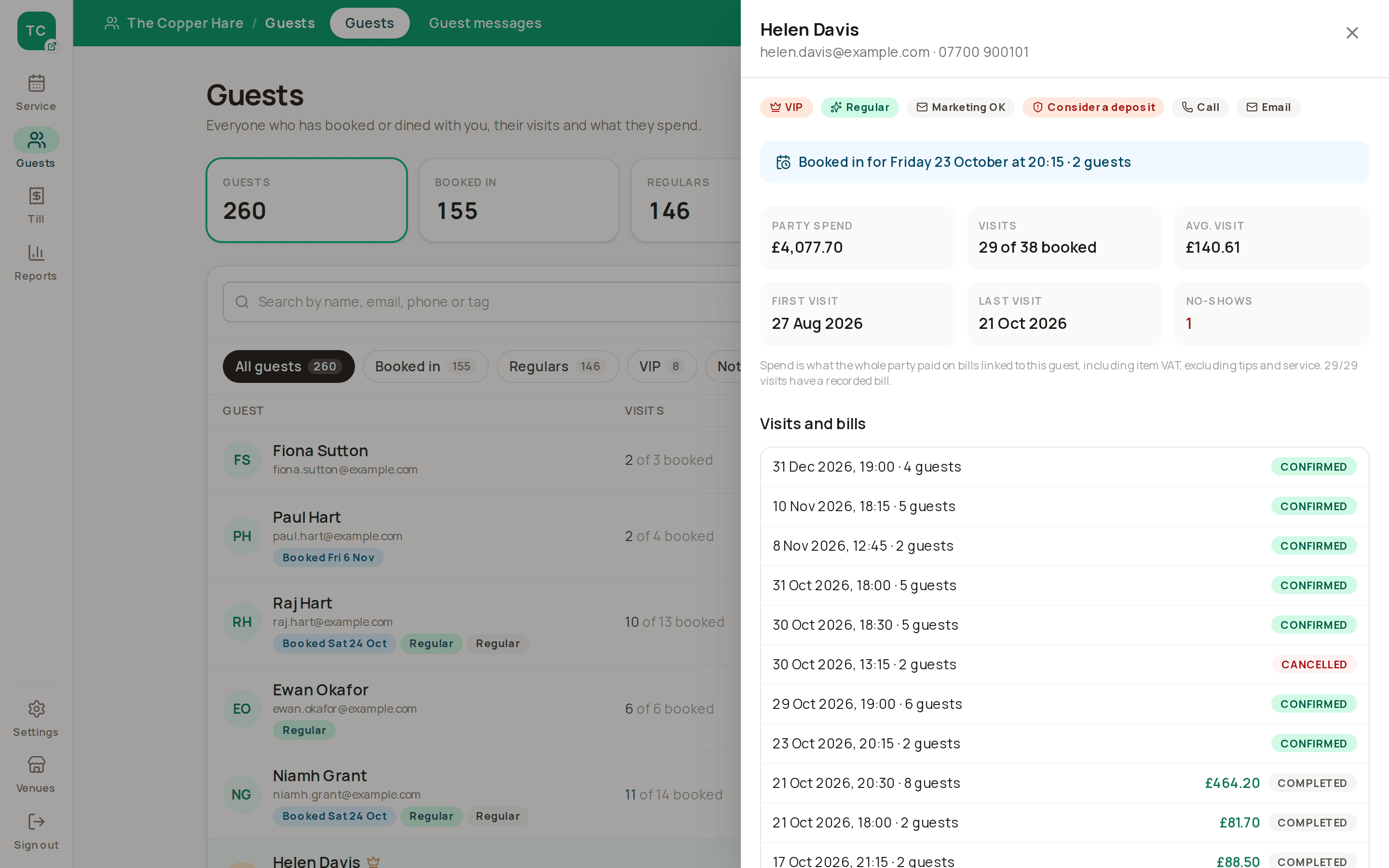
Guest profiles collect visits, no-shows, tags, notes and spend from settled bills. Reports show covers, sales, no-shows, discounts and which channels bring bookings, venue by venue or side by side.

  • Marketing consent recorded for UK GDPR and PECR
  • CSV import from your old system, CSV export any time
  • Duplicate merges and erasure requests without a developer
  • Closed trading days locked and exported as CSV for your accountant
Guest profile and reports: A regular's profile with visits, spend, no-shows and upcoming bookings.

Control and reliability

Safe to hand to casual staff

Only managers can give money away, every void and refund is traceable, and access ends when someone leaves. Till-only staff sign on with a code instead of a login, invitations expire and staff reset their own passwords.

Roles for every job

Owner, Manager, Host, Server and Kitchen each see only what they need, and the Team page shows exactly what each can do.

Audit trail

Every void, refund, discount and price change needs a reason, and the Till log shows who, when and why.

No double-bookings or double charges

Bookings and bills are protected when two people act at once, and payments are idempotent.

Messages that don't fail silently

Email, SMS, reminders and refunds retry automatically, and staff can see anything stuck.

Multi-site

Compare every site without a spreadsheet

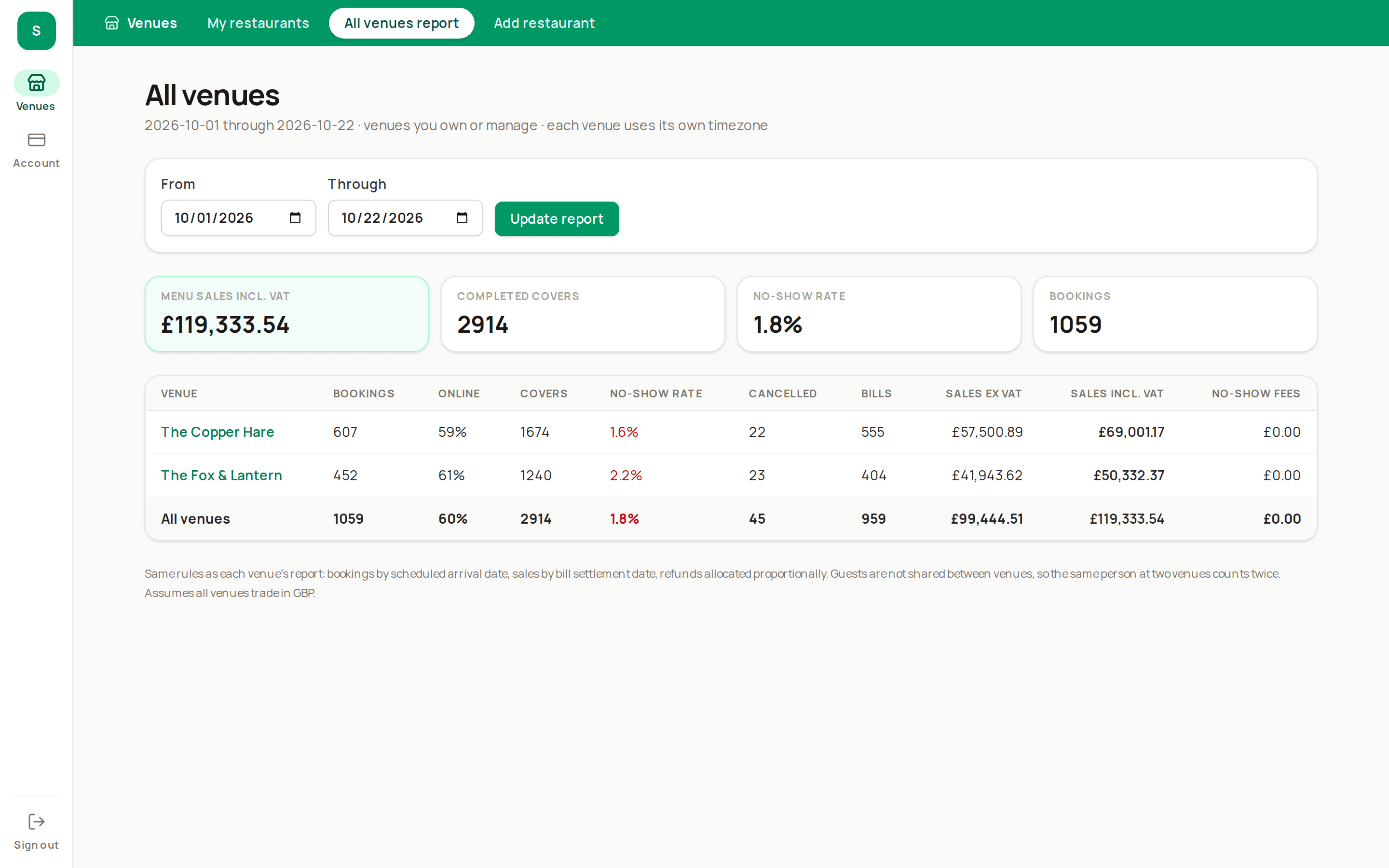
Covers, sales, no-shows, refunds, discounts and booking sources for each venue, or all of them side by side.

One login covers every venue you own or work at, so managers and staff who move between sites don't juggle accounts.

Multi-venue plan

All-venues report: Two sites compared: covers, sales, no-show rate and booking source.

Everything in Slotivo

The full list

Everything is included on every plan, apart from items marked for the till plans or the ordering add-on.

Online bookings

  • Public booking page, any time, on phone or desktop
  • Website embed, booking link and QR code
  • Three widget layouts with brand colours, logo, fonts and a live preview
  • Live availability with pacing and reset buffers
  • Split services, overrides and special dates
  • Longer dining times for larger parties
  • Booking notice and how far ahead guests can book
  • Next available dates when a day is full
  • Public waitlist with email and text offers
  • Self-service change and cancel links
  • Add to calendar in one tap

Events

  • Priced events with a set menu, shown on the booking page
  • Whole-day or part-day event windows
  • Pay upfront, per-person deposit or on the day
  • Optional cover cap
  • Live covers sold, booked value and money paid
  • Set menu added to the bill, prepayment redeemed at the till

Deposits and no-shows

  • Fixed or per-person deposits via your own Stripe account
  • Card guarantees with a no-show fee
  • Deposits applied to the bill at the till
  • Partial refunds, late-payment recovery and Stripe reconciliation
  • Short payment holds that release unpaid tables

Reminders and messages

  • Confirmation, change, cancellation and reminder emails
  • SMS confirmations, reminders and waitlist offers
  • Email and SMS queue with retry in admin
  • Receipt emails from the till

Floor plan and tables

  • Floor plan builder with walls, doors, pillars and undo
  • Named layouts scheduled by date range, weekday and service
  • Table joins and party-size limits per table
  • Automatic table allocation
  • Staff locks for regulars' favourite tables
  • Walk-in holds and daily online cover caps
  • Table and room closures that move bookings

Front of house

  • Service list and live floor view
  • Table diary timeline
  • Walk-ins and waitlist seating
  • Booking status from confirmed to completed or no-show
  • Getting-started checklist for new venues

TillTill plans

  • Colour-coded touch till for iPad or desktop
  • Staff sign-on codes on a shared till, with an adjustable auto-lock
  • Till-only staff with a code, no email or login
  • Cash-up and printable Z-reports with VAT breakdown and cash variance
  • Till log of voids, refunds, discounts and price changes, with reasons
  • Item options with prices
  • Kitchen notes with ready-made shortcuts
  • Bills on tables, or on free text like “Bar 2”
  • Table map with spend, time open and held courses
  • Payment pad for card, cash and deposits
  • Split bills evenly or by item
  • Discounts, service charge and tips for managers
  • Printable and email receipts with VAT breakdown
  • Voids and refunds with permissions
  • Menu management with VAT rates and options

Kitchen and barTill plans

  • Orders split into kitchen and bar tickets
  • Kitchen display with amber and red timers
  • Bump and recall
  • Hold and fire courses, or send everything together
  • Held courses shown to the kitchen for prep
  • Locked sent items and red VOID tickets
  • Sold out (86) from the till or kitchen
  • Kitchen-only staff logins

Printers and card machinesTill plans

  • Step-by-step setup for your exact model
  • Cloud receipt and kitchen printers, nothing to install
  • Slotivo Bridge for most other thermal printers
  • Printed kitchen and bar tickets, with prep and FIRE slips
  • Stripe and Square card machines from the till
  • Refunds back to the card
  • Automatic receipts when a bill is paid

Collection and deliveryOrdering add-on

  • Your own ordering page for today's orders
  • Collection and delivery prices, descriptions and allergens
  • Online payment to your own Stripe account
  • Hours, date exceptions, postcodes, fees and minimum spend
  • Kitchen limits and dine-in occupancy protection
  • Orders released to the kitchen when they're due
  • One-tap pause for either channel
  • Order tracking link and email updates
  • Cancellations and refunds
  • Orders reconcile with the till, cash-up and ledger

Guests and reports

  • Guest profiles with visits, no-shows, tags and notes
  • Spend per guest from settled bills
  • Marketing consent tracking
  • CSV import and export
  • Reversible duplicate merges and anonymisation
  • Venue reports: covers, sales, no-shows, sources
  • All-venues report (Multi-venue)
  • Locked trading days with CSV export for your accountant

Account and billing

  • One login for every venue you own or work at
  • Start free, no card needed
  • Upgrade, switch or move to free yourself
  • Card details and invoices in Stripe's portal
  • Pro-rata upgrades; downgrades at the end of the month
  • Grace period while a failed card is retried

Team, security and reliability

  • Owner, Manager, Host, Server and Kitchen roles, with a permissions table
  • Expiring invitations and password recovery
  • Audit trail for till actions and money
  • Protection against double-bookings and double charges
  • Automatic retries for messages, holds and refunds
  • Scripted backups and one-command deployment
  • Legacy data import, without invented payment history

Pricing

Start free. Add the till when you're ready.

One plan covers every venue on your account. Monthly, no contract, and no commission on bookings on any plan.

Reservations

Online bookings and the floor for one venue.

Free

For a restaurant that already has a till, or wants to try Slotivo. Replaces paid booking platforms and their per-cover fees.

  • 1 venue
  • Commission-free booking page, embed and QR code
  • Priced events like Christmas Day and Mother's Day
  • Floor plan, table diary and waitlist
  • Deposits, card guarantees and reminders
  • Guest profiles and reports
Start free
Most complete for one site

Reservations + Till

Everything in Reservations, plus the till and kitchen screens.

£10a month

One system from booking to bill. Replaces a separate EPOS subscription and the ticket printer.

  • Everything in Reservations
  • Touch till with split bills and table map
  • Kitchen and bar screens with courses
  • Menu, sold-out items and receipts
Choose Reservations + Till

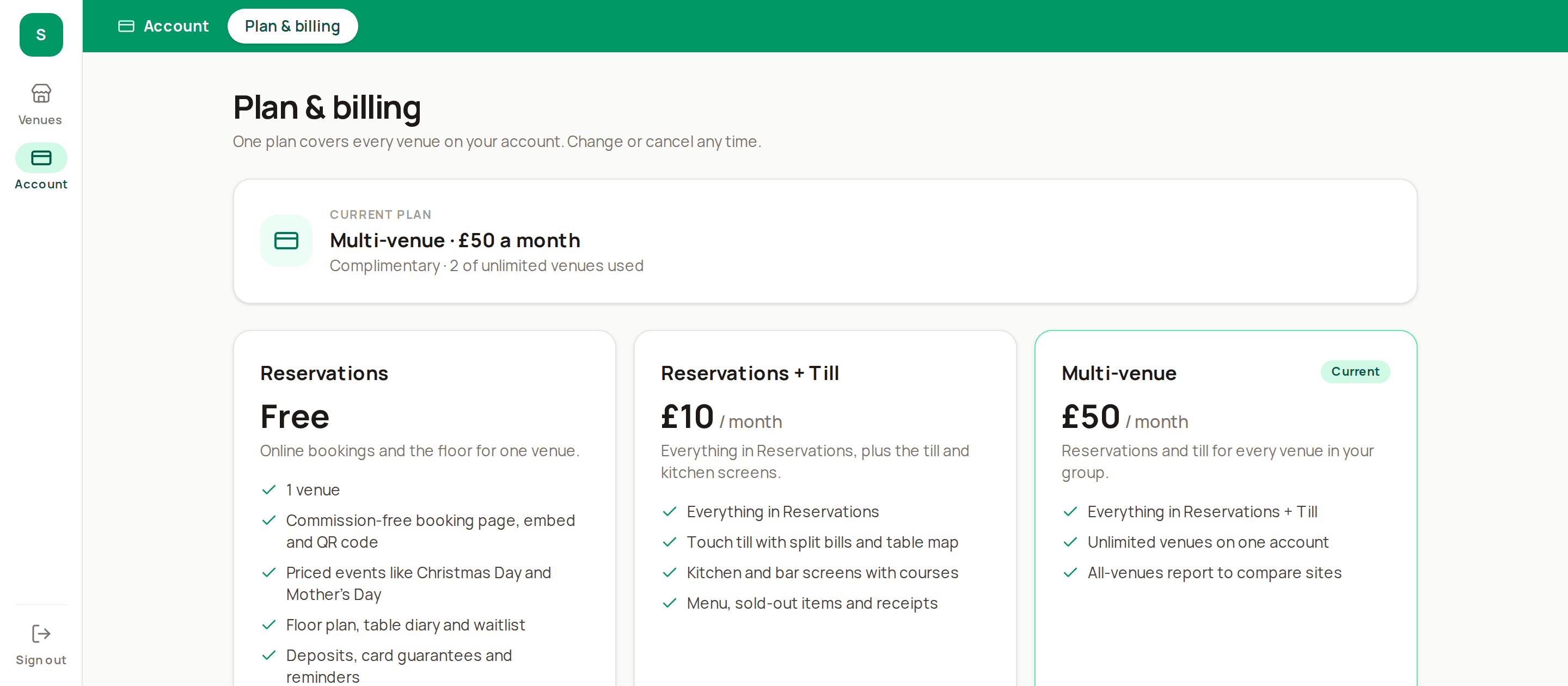
Multi-venue

Reservations and till for every venue in your group.

£50a month

Every site on one account and one bill, at a flat price that doesn't grow per venue.

  • Everything in Reservations + Till
  • Unlimited venues on one account
  • All-venues report to compare sites
Choose Multi-venue

Optional add-on

Takeaway ordering

£10a month per venue

Collection and delivery orders on your own page, for any venue on a till plan.

  • Your own ordering page for collection and delivery
  • Online payment to your own Stripe account, no commission per order
  • Hours, delivery postcodes, fees and kitchen limits
  • Orders sent to the kitchen when they're due

Everyone starts free with no card. Upgrades start straight away and are charged pro rata; moving to free takes effect at the end of the paid month. Manage your plan, card and invoices yourself from Plan & billing.

Plan & billing page: Admin → Plan & billing: the three plans with the current one marked.

Guides

Thinking of switching?

All guides

Questions restaurants ask

Does Slotivo take a commission on bookings?+

No. Guests book through your own booking page, website embed, social links and QR codes. Deposits go to your own Stripe account.

Does the till connect to my card machine?+

Yes, with Stripe and Square card machines: the till sends the exact amount and the bill settles itself when the guest pays. Dojo is on the way. Payments on any other machine can still be recorded by hand, and deposits taken online are applied to the bill automatically.

Does it print tickets or work offline?+

The kitchen and bar can run on screens, printers or both. Cloud printers from Star and Epson connect with nothing to install, and the small Slotivo Bridge drives most other thermal printers. Slotivo needs an internet connection.

Can customers order collection or delivery?+

Yes, with the £10 a month takeaway ordering add-on on a till plan. Customers order and pay for today on your own ordering page, with no commission per order. You set the hours, delivery postcodes, fees and kitchen limits, and delivery is by your own drivers.

Can I bring my guest list with me?+

Yes. Import guests from CSV, and export them again whenever you want. It's your data.

We run more than one site. Does that work?+

Yes. Each venue has its own floor plan, menu and team, and the all-venues report compares sites side by side. One login covers every site.

Is it built for the UK?+

Yes. VAT on receipts, UK GDPR consent records, SMS reminders and correct handling when the clocks change.

Can I sell Christmas Day or Mother's Day as a set-menu event?+

Yes, on every plan. Set a per-person price and set menu, choose whether guests pay in full, pay a deposit or pay on the day, and cap the covers if you like. Events can run past midnight into the next day, and staff record set-menu choices per booking for kitchen prep totals. Choices appear on the bill without an extra charge.

Is the Reservations plan really free?+

Yes, for one venue, with no card needed. It includes online bookings, the floor plan, deposits, reminders, guests and reports. Add the till or more venues when you need them.

Can I change or cancel my plan?+

Any time, from the Plan & billing page. Plans are monthly with no contract. Upgrades start straight away and are charged pro rata. Moving to free takes effect at the end of the month you've paid for, and you can undo it before then.

What happens if my card payment fails?+

Your plan keeps running while Stripe retries the card, so you're not cut off in the middle of service.

What happens to my data if I downgrade?+

Nothing is deleted. Venues over the new plan's limit are paused, which stops online booking and staff access, and they come straight back if you upgrade again.
Run your next service on Slotivo

Create your venue, draw your floor plan and add your menu. A getting-started checklist walks you through the rest. Free for one venue, no card needed.

Create your account